I was doing DBA work this week. We installed our application in different schema and the performance dropped to hell.
The View objects queries that we spend a lot of time tuning in previous schema now they had different execution plan.
So I check the instance properties and I see OPTIMIZER_MODE=ALL_ROWS.
This option means that when you do a query the optimizer thinks that you are trying to retrieve all data from the query so it check the statistics to find the best plan to retrieve all rows usually by full table scans. The all_rows mode is generally used during batch-oriented processing and for data warehouses where the goal is to minimize server resource consumption.
This is not the case in our application and I guess in most ADF applications. I changed it to OPTIMIZER_MODE=FIRST_ROWS. The first_rows optimizer_mode is generally used in online system where the end-user wants to see the first page of query results as quickly as possible. This had a huge positive effect in the performance of our fusion application.
May be this is considered basic for DBAs but it seems that ADF developers should know also in order not to loose time tuning view objects in a wrong configured database.
Showing posts with label Tuning. Show all posts
Showing posts with label Tuning. Show all posts
Friday, May 14, 2010

Friday, February 26, 2010
Limit Query Results based on custom property
In ADF, for performance reasons you need to limit the results of the query of a view object. Also you need to inform the user that the results are limited so that he will know that he need to put specific criteria to find specific records.
You can use up To Row Number property in view object tuning, yet this just limit the fetched records and not the query.
You can use Range Paging option. Yet data for each row must be posted before you change row, so that makes it hard to use on view objects used for transactions.
So if a view object is based on entity that has many data it make it hard to tune.
An option for better performance is to use performance tip on tunning FIRST_ROWS and at the same time to limit the results of the query adding in where clause ‘ROWNUM <= :queryLimit’. In order to do that generic and not to change where clause of queries for each view object you need to tune, I use a custom property on view object ‘QueryLimit’ In the ViewObjectImpl
You can use up To Row Number property in view object tuning, yet this just limit the fetched records and not the query.
You can use Range Paging option. Yet data for each row must be posted before you change row, so that makes it hard to use on view objects used for transactions.
So if a view object is based on entity that has many data it make it hard to tune.
An option for better performance is to use performance tip on tunning FIRST_ROWS and at the same time to limit the results of the query adding in where clause ‘ROWNUM <= :queryLimit’. In order to do that generic and not to change where clause of queries for each view object you need to tune, I use a custom property on view object ‘QueryLimit’ In the ViewObjectImpl
I override method executeQueryForCollection and, if there is a 'QueryLimit' property on view object then it apply a limit to the query of view object "ROWNUM <=QueryLimit" before performing query. Also after query I set the property "ResultsLimited" to "true" if queried records are not less of the QueryLimit.

I also have a method that checks ResultsLimited and return a message that the results are limited. I expose that method to client and use it from backing bean to show message to the user when results are limited.

We have put the logic in our base ViewObjectImpl class so it can be used from every view object
This approach boosted the performance in our application, of transaction pages that was based on tables with large amount of data.
This approach boosted the performance in our application, of transaction pages that was based on tables with large amount of data.
Test Case
Monday, February 1, 2010
Bind Variable and View Criteria in view with range paging bug (Fixed in 11.1.1.4)
I managed to reproduce bug described in
http://adfbugs.blogspot.com/2010/01/new-bind-variable-and-view-criteria-bug.html
in a simple query page for view object with Range paging tuning.
When you query with a department then Reset and then Query again after scrolling and selecting rows, it throws exception:
java.sql.SQLException: Attempt to set a parameter name that does not occur in the SQL: inDeptId

Test Case
http://adfbugs.googlecode.com/files/TestNewBindVariableRP.zip
http://adfbugs.blogspot.com/2010/01/new-bind-variable-and-view-criteria-bug.html
in a simple query page for view object with Range paging tuning.
When you query with a department then Reset and then Query again after scrolling and selecting rows, it throws exception:
java.sql.SQLException: Attempt to set a parameter name that does not occur in the SQL: inDeptId

Test Case
http://adfbugs.googlecode.com/files/TestNewBindVariableRP.zip
Monday, January 18, 2010
Selectively required criteria in LOV (Fixed in 11.1.1.3)
In order to improve performance in LOVs I tried to set selectively required criteria, so that the query of LOV should always run with some parameters.
So in simple department LOV in employees.departmentId attribute I put view criteria with selectively required option.


Also as in test case :
http://adfbugs.blogspot.com/2009/08/lov-execute-query-many-times.html
I override the method executeQuery for collection and print the query:
@Override
protected void executeQueryForCollection(Object object, Object[] object2, int i) {
System.out.println("EmployeesLOV executes Query :" + this.getQuery());
super.executeQueryForCollection(object, object2, i);
}

When I run application and open LOV and select a value, in log I see that 3!? Queries are executed:
Query : SELECT Departments.DEPARTMENT_ID, Departments.DEPARTMENT_NAME, Departments.MANAGER_ID, Departments.LOCATION_ID FROM DEPARTMENTS Departments WHERE ( ( (UPPER(Departments.DEPARTMENT_NAME) LIKE UPPER( :vc_temp_1 '%') ) ) )
Query : SELECT Departments.DEPARTMENT_ID, Departments.DEPARTMENT_NAME, Departments.MANAGER_ID, Departments.LOCATION_ID FROM DEPARTMENTS Departments WHERE ( ( ( (UPPER(Departments.DEPARTMENT_NAME) LIKE UPPER( :vc_temp_1 '%') ) ) ) AND ( ( (Departments.DEPARTMENT_ID LIKE :vc_temp_2 ) ) AND ( ( (UPPER(Departments.DEPARTMENT_NAME) LIKE UPPER( :vc_temp_3 '%') ) ) ) ) )
Query : SELECT Departments.DEPARTMENT_ID, Departments.DEPARTMENT_NAME, Departments.MANAGER_ID, Departments.LOCATION_ID FROM DEPARTMENTS Departments
The Last query without any criteria !?
If I just type a valid value to the field and press tab then 4!? Queries are executed:
Query : SELECT Departments.DEPARTMENT_ID, Departments.DEPARTMENT_NAME, Departments.MANAGER_ID, Departments.LOCATION_ID FROM DEPARTMENTS Departments WHERE ( ( (Departments.DEPARTMENT_ID LIKE ( :vc_temp_1 '%') ) ) )
Query : SELECT Departments.DEPARTMENT_ID, Departments.DEPARTMENT_NAME, Departments.MANAGER_ID, Departments.LOCATION_ID FROM DEPARTMENTS Departments WHERE (Departments.DEPARTMENT_ID = :fbkKy__0)
Query : SELECT Departments.DEPARTMENT_ID, Departments.DEPARTMENT_NAME, Departments.MANAGER_ID, Departments.LOCATION_ID FROM DEPARTMENTS Departments WHERE ( ( (Departments.DEPARTMENT_ID LIKE :vc_temp_1 ) ) AND ( ( (UPPER(Departments.DEPARTMENT_NAME) LIKE UPPER( :vc_temp_2 '%') ) ) ) )
Query : SELECT Departments.DEPARTMENT_ID, Departments.DEPARTMENT_NAME, Departments.MANAGER_ID, Departments.LOCATION_ID FROM DEPARTMENTS Departments
The Last query again without any criteria !?
So you don’t gain much in performance of LOV since the query is executed many times again and without any criteria.
Also sometimes when you just type a value, you get the PPR exception, or an invalid value exception even if the value is valid.
Steps to reproduce:
1. Run TestLOV page
2. open department LOV, type A in DepartmentName criterion and press search
3. Without selecting a row press OK or cancel.
4. Type a valid value to LOV (i.e. 50) invalid value message appear.

5. Open LOV again, press OK or cancel then press submit button

oracle.jbo.AttrValException: JBO-27036: At least one of the following attributes DepartmentName, ManagerId is required. at oracle.jbo.rules.JboVCItemRequiredValidator.validate(JboVCItemRequiredValidator.java:172) at oracle.jbo.common.ViewCriteriaImpl.validateRow(ViewCriteriaImpl.java:606)
It seems that Selectively required criteria in LOV has some issues.
Test Case :
http://adfbugs.googlecode.com/files/TestLovSelectivelyRequired.zip
So in simple department LOV in employees.departmentId attribute I put view criteria with selectively required option.


Also as in test case :
http://adfbugs.blogspot.com/2009/08/lov-execute-query-many-times.html
I override the method executeQuery for collection and print the query:
@Override
protected void executeQueryForCollection(Object object, Object[] object2, int i) {
System.out.println("EmployeesLOV executes Query :" + this.getQuery());
super.executeQueryForCollection(object, object2, i);
}

When I run application and open LOV and select a value, in log I see that 3!? Queries are executed:
Query : SELECT Departments.DEPARTMENT_ID, Departments.DEPARTMENT_NAME, Departments.MANAGER_ID, Departments.LOCATION_ID FROM DEPARTMENTS Departments WHERE ( ( (UPPER(Departments.DEPARTMENT_NAME) LIKE UPPER( :vc_temp_1 '%') ) ) )
Query : SELECT Departments.DEPARTMENT_ID, Departments.DEPARTMENT_NAME, Departments.MANAGER_ID, Departments.LOCATION_ID FROM DEPARTMENTS Departments WHERE ( ( ( (UPPER(Departments.DEPARTMENT_NAME) LIKE UPPER( :vc_temp_1 '%') ) ) ) AND ( ( (Departments.DEPARTMENT_ID LIKE :vc_temp_2 ) ) AND ( ( (UPPER(Departments.DEPARTMENT_NAME) LIKE UPPER( :vc_temp_3 '%') ) ) ) ) )
Query : SELECT Departments.DEPARTMENT_ID, Departments.DEPARTMENT_NAME, Departments.MANAGER_ID, Departments.LOCATION_ID FROM DEPARTMENTS Departments
The Last query without any criteria !?
If I just type a valid value to the field and press tab then 4!? Queries are executed:
Query : SELECT Departments.DEPARTMENT_ID, Departments.DEPARTMENT_NAME, Departments.MANAGER_ID, Departments.LOCATION_ID FROM DEPARTMENTS Departments WHERE ( ( (Departments.DEPARTMENT_ID LIKE ( :vc_temp_1 '%') ) ) )
Query : SELECT Departments.DEPARTMENT_ID, Departments.DEPARTMENT_NAME, Departments.MANAGER_ID, Departments.LOCATION_ID FROM DEPARTMENTS Departments WHERE (Departments.DEPARTMENT_ID = :fbkKy__0)
Query : SELECT Departments.DEPARTMENT_ID, Departments.DEPARTMENT_NAME, Departments.MANAGER_ID, Departments.LOCATION_ID FROM DEPARTMENTS Departments WHERE ( ( (Departments.DEPARTMENT_ID LIKE :vc_temp_1 ) ) AND ( ( (UPPER(Departments.DEPARTMENT_NAME) LIKE UPPER( :vc_temp_2 '%') ) ) ) )
Query : SELECT Departments.DEPARTMENT_ID, Departments.DEPARTMENT_NAME, Departments.MANAGER_ID, Departments.LOCATION_ID FROM DEPARTMENTS Departments
The Last query again without any criteria !?
So you don’t gain much in performance of LOV since the query is executed many times again and without any criteria.
Also sometimes when you just type a value, you get the PPR exception, or an invalid value exception even if the value is valid.
Steps to reproduce:
1. Run TestLOV page
2. open department LOV, type A in DepartmentName criterion and press search
3. Without selecting a row press OK or cancel.
4. Type a valid value to LOV (i.e. 50) invalid value message appear.

5. Open LOV again, press OK or cancel then press submit button

oracle.jbo.AttrValException: JBO-27036: At least one of the following attributes DepartmentName, ManagerId is required. at oracle.jbo.rules.JboVCItemRequiredValidator.validate(JboVCItemRequiredValidator.java:172) at oracle.jbo.common.ViewCriteriaImpl.validateRow(ViewCriteriaImpl.java:606)
It seems that Selectively required criteria in LOV has some issues.
Test Case :
http://adfbugs.googlecode.com/files/TestLovSelectivelyRequired.zip
Sunday, September 6, 2009
ExecuteEmptyRowSet and Range Paging. (Fixed in 11.1.2)
As andrejus showed you can reduce the time loading a page by executing Empty row set before page opens.
http://andrejusb.blogspot.com/2009/08/oracle-adf-tuning-preventing-sql-query.html
Yet this does not combine with Range Paging since getEstimatedRowCount give result in an empty row set when Range paging is used.
To test that i created an Employees view object and a method in application module that executes empty row set and estimate row count:
public long emptyRowSetCount(){
this.getEmployeesView1().executeEmptyRowSet();
return getEmployeesView1().getEstimatedRowCount();
}
this return 0 in default view object.
but if i set Employees view object Access Mode = Range paging then the method return the count of rows of the database.

The getFetchedRowCount return 0 in both cases but this is not exposed in the bindings and on the pages we usually use #{bindings.EmployeesView1Iterator.estimatedRowCount}.
In ViewObjectImpl java doc, the method executeEmptyRowSet does not have any comments, so its not clear what it does.
So i wander if this is an issue of executeEmptyRowSet or getEstimatedRowCount or Range Paging...
Test Case:
http://adfbugs.googlecode.com/files/TestEmptyRowSet.zip
Not Reproduced in jdeveloper 11.1.2
http://andrejusb.blogspot.com/2009/08/oracle-adf-tuning-preventing-sql-query.html
Yet this does not combine with Range Paging since getEstimatedRowCount give result in an empty row set when Range paging is used.
To test that i created an Employees view object and a method in application module that executes empty row set and estimate row count:
public long emptyRowSetCount(){
this.getEmployeesView1().executeEmptyRowSet();
return getEmployeesView1().getEstimatedRowCount();
}
this return 0 in default view object.
but if i set Employees view object Access Mode = Range paging then the method return the count of rows of the database.

The getFetchedRowCount return 0 in both cases but this is not exposed in the bindings and on the pages we usually use #{bindings.EmployeesView1Iterator.estimatedRowCount}.
In ViewObjectImpl java doc, the method executeEmptyRowSet does not have any comments, so its not clear what it does.
So i wander if this is an issue of executeEmptyRowSet or getEstimatedRowCount or Range Paging...
Test Case:
http://adfbugs.googlecode.com/files/TestEmptyRowSet.zip
Not Reproduced in jdeveloper 11.1.2
Sunday, August 30, 2009
LOV execute query many times (Fixed in 11.1.1.3)
Input list of values component has big performance issues, and it seems not suitable for view objects with a lot of data.
Not only you cant use performance tuning since there are bugs if you use range paging:
http://adfbugs.blogspot.com/2009/07/performance-tuning-lovs-and-range.html
and Up to row number:
http://adfbugs.blogspot.com/2009/08/lov-view-object-tuning-only-up-to-row.html
but also because every time you open LOV and select a value it execute query many times.
To test that, i override the method executeQuery for collection and print the query:
@Override
protected void executeQueryForCollection(Object object, Object[] object2, int i) {
System.out.println("EmployeesLOV executes Query :" + this.getQuery());
super.executeQueryForCollection(object, object2, i);
}
when i open the lov and select a value i get the following log:
EmployeesLOV executes Query :Select * from Employees
30-Aug-2009 17:25:04 oracle.adfinternal.view.faces.renderkit.rich.RichRenderKit isNavigating
SEVERE: The original view root was not set.
EmployeesLOV executes Query :SELECT * FROM (Select * from Employees) QRSLT WHERE ( ( ( (EMPLOYEE_ID = :vc_temp_2 ) ) ) )
EmployeesLOV executes Query :Select * from Employees
so the LOV query is executed 3 times !?
If i type a value to fields that many LOV values start with this value then it is executed many times !!!.
EmployeesLOV executes Query :SELECT * FROM (Select * from Employees) QRSLT WHERE ( ( (EMPLOYEE_ID LIKE :vc_temp_2 ) ) )
30-Aug-2009 17:31:34 oracle.adfinternal.view.faces.renderkit.rich.RichRenderKit isNavigating
SEVERE: The original view root was not set.
EmployeesLOV executes Query :SELECT * FROM (Select * from Employees) QRSLT WHERE ( ( (EMPLOYEE_ID LIKE :vc_temp_2 ) ) )
EmployeesLOV executes Query :SELECT * FROM (Select * from Employees) QRSLT WHERE ( ( (EMPLOYEE_ID LIKE :vc_temp_2 ) ) )
EmployeesLOV executes Query :SELECT * FROM (Select * from Employees) QRSLT WHERE ( ( (EMPLOYEE_ID LIKE :vc_temp_2 ) ) )
EmployeesLOV executes Query :SELECT * FROM (Select * from Employees) QRSLT WHERE ( ( (EMPLOYEE_ID LIKE :vc_temp_2 ) ) )
EmployeesLOV executes Query :SELECT * FROM (Select * from Employees) QRSLT WHERE ( ( (EMPLOYEE_ID = :vc_temp_2 ) ) )
EmployeesLOV executes Query :Select * from Employees
Also while you scroll up and down in LOV the query is also executed many times.
Finaly if you type a value that many LOV values start with this value and scroll down then other values that dont start with this value are visible:

And if you select the value then you get a strange error:

Is this a bug?
Is there a way to use LOVs with a lot of data?
Test case:
http://adfbugs.googlecode.com/files/TestPerformance.zip
For the test case i put in Employees table about 100000 rows with the following procedure:
create or replace
PROCEDURE CREATE_EMPLOYEES AS
BEGIN
FOR i IN 1..100000 LOOP
Insert into employees (employee_id,
last_name,
email,
hire_date,
job_id)
select employees_seq.nextval as employee_id,
'auto' i as last_name,
'aut' i '@gmail.com' as email,
sysdate as hire_date,
'IT_PROG' as job_id
from dual;
END LOOP;
COMMIT;
END CREATE_EMPLOYEES;
Not only you cant use performance tuning since there are bugs if you use range paging:
http://adfbugs.blogspot.com/2009/07/performance-tuning-lovs-and-range.html
and Up to row number:
http://adfbugs.blogspot.com/2009/08/lov-view-object-tuning-only-up-to-row.html
but also because every time you open LOV and select a value it execute query many times.
To test that, i override the method executeQuery for collection and print the query:
@Override
protected void executeQueryForCollection(Object object, Object[] object2, int i) {
System.out.println("EmployeesLOV executes Query :" + this.getQuery());
super.executeQueryForCollection(object, object2, i);
}
when i open the lov and select a value i get the following log:
EmployeesLOV executes Query :Select * from Employees
30-Aug-2009 17:25:04 oracle.adfinternal.view.faces.renderkit.rich.RichRenderKit isNavigating
SEVERE: The original view root was not set.
EmployeesLOV executes Query :SELECT * FROM (Select * from Employees) QRSLT WHERE ( ( ( (EMPLOYEE_ID = :vc_temp_2 ) ) ) )
EmployeesLOV executes Query :Select * from Employees
so the LOV query is executed 3 times !?
If i type a value to fields that many LOV values start with this value then it is executed many times !!!.
EmployeesLOV executes Query :SELECT * FROM (Select * from Employees) QRSLT WHERE ( ( (EMPLOYEE_ID LIKE :vc_temp_2 ) ) )
30-Aug-2009 17:31:34 oracle.adfinternal.view.faces.renderkit.rich.RichRenderKit isNavigating
SEVERE: The original view root was not set.
EmployeesLOV executes Query :SELECT * FROM (Select * from Employees) QRSLT WHERE ( ( (EMPLOYEE_ID LIKE :vc_temp_2 ) ) )
EmployeesLOV executes Query :SELECT * FROM (Select * from Employees) QRSLT WHERE ( ( (EMPLOYEE_ID LIKE :vc_temp_2 ) ) )
EmployeesLOV executes Query :SELECT * FROM (Select * from Employees) QRSLT WHERE ( ( (EMPLOYEE_ID LIKE :vc_temp_2 ) ) )
EmployeesLOV executes Query :SELECT * FROM (Select * from Employees) QRSLT WHERE ( ( (EMPLOYEE_ID LIKE :vc_temp_2 ) ) )
EmployeesLOV executes Query :SELECT * FROM (Select * from Employees) QRSLT WHERE ( ( (EMPLOYEE_ID = :vc_temp_2 ) ) )
EmployeesLOV executes Query :Select * from Employees
Also while you scroll up and down in LOV the query is also executed many times.
Finaly if you type a value that many LOV values start with this value and scroll down then other values that dont start with this value are visible:

And if you select the value then you get a strange error:

Is this a bug?
Is there a way to use LOVs with a lot of data?
Test case:
http://adfbugs.googlecode.com/files/TestPerformance.zip
For the test case i put in Employees table about 100000 rows with the following procedure:
create or replace
PROCEDURE CREATE_EMPLOYEES AS
BEGIN
FOR i IN 1..100000 LOOP
Insert into employees (employee_id,
last_name,
email,
hire_date,
job_id)
select employees_seq.nextval as employee_id,
'auto' i as last_name,
'aut' i '@gmail.com' as email,
sysdate as hire_date,
'IT_PROG' as job_id
from dual;
END LOOP;
COMMIT;
END CREATE_EMPLOYEES;
Friday, August 14, 2009
Range Paging in Master Detail bug. (Fixed in 11.1.1.3)
When i thried to set Range Paging in some view objects in our application i had the following exception:
oracle.jbo.InvalidOperException: JBO-25011: Rowset Employees_Departments1_EmpDeptFkLink_DepartmentsView_0 is forward only. at oracle.jbo.server.ViewObjectImpl.validateRangeSizeForRangePaging(ViewObjectImpl.java:13522) at oracle.jbo.server.ViewRowSetIteratorImpl.setRangeSize(ViewRowSetIteratorImpl.java:529) at oracle.jbo.server.ViewRowSetImpl.setRangeSize(ViewRowSetImpl.java:2633) at oracle.jbo.server.ViewObjectImpl.doCreateViewLinkAccessorRS(ViewObjectImpl.java:13534) at oracle.jbo.server.ViewObjectImpl.createViewLinkAccessorRS(ViewObjectImpl.java:13624) at oracle.jbo.server.AssociationDefImpl.get(AssociationDefImpl.java:405) at oracle.jbo.server.ViewAttributeDefImpl.get(ViewAttributeDefImpl.java:773) at oracle.jbo.server.ViewRowStorage.getViewLinkAccessorResult(ViewRowStorage.java:1365) at oracle.jbo.server.ViewRowStorage.getAttributeInternal(ViewRowStorage.java:1579) at oracle.jbo.server.ViewRowImpl.getAttributeValue(ViewRowImpl.java:1795) at oracle.jbo.server.ViewRowImpl.getAttributeInternal(ViewRowImpl.java:783) at model.EmployeesViewRowImpl.getMasterDepartment(EmployeesViewRowImpl.java:522)
This happens if you use a master Accessor in a detail view object.
So i reproduced in a simple test case:
I have a simple Departments Employees master detail relation.
In Employees view object i create a transient Attribute IsDepartmentManager that i want to check if the employee is the manager of the department.
To do that i need the department assecor in Employees. so i do that from the View link.
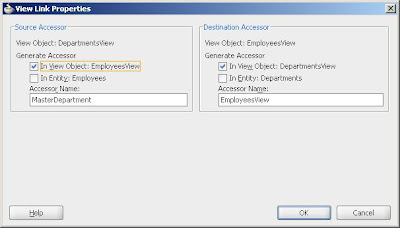
In the getter of transient attribute i get the attribute of master :
public Boolean getisDepartmentManager() {
Object depManager = this.getMasterDepartment().getAttribute("ManagerId");
return depManager != null && depManager.equals(this.getEmployeeId());
}
When i Run application, everything is working fine:

But if i set Range Paging on tuning of Departments View and run again :

Is this a bug?
Am i missing something?
Test case:
http://adfbugs.googlecode.com/files/TestRPMasterDetail.zip
oracle.jbo.InvalidOperException: JBO-25011: Rowset Employees_Departments1_EmpDeptFkLink_DepartmentsView_0 is forward only. at oracle.jbo.server.ViewObjectImpl.validateRangeSizeForRangePaging(ViewObjectImpl.java:13522) at oracle.jbo.server.ViewRowSetIteratorImpl.setRangeSize(ViewRowSetIteratorImpl.java:529) at oracle.jbo.server.ViewRowSetImpl.setRangeSize(ViewRowSetImpl.java:2633) at oracle.jbo.server.ViewObjectImpl.doCreateViewLinkAccessorRS(ViewObjectImpl.java:13534) at oracle.jbo.server.ViewObjectImpl.createViewLinkAccessorRS(ViewObjectImpl.java:13624) at oracle.jbo.server.AssociationDefImpl.get(AssociationDefImpl.java:405) at oracle.jbo.server.ViewAttributeDefImpl.get(ViewAttributeDefImpl.java:773) at oracle.jbo.server.ViewRowStorage.getViewLinkAccessorResult(ViewRowStorage.java:1365) at oracle.jbo.server.ViewRowStorage.getAttributeInternal(ViewRowStorage.java:1579) at oracle.jbo.server.ViewRowImpl.getAttributeValue(ViewRowImpl.java:1795) at oracle.jbo.server.ViewRowImpl.getAttributeInternal(ViewRowImpl.java:783) at model.EmployeesViewRowImpl.getMasterDepartment(EmployeesViewRowImpl.java:522)
This happens if you use a master Accessor in a detail view object.
So i reproduced in a simple test case:
I have a simple Departments Employees master detail relation.
In Employees view object i create a transient Attribute IsDepartmentManager that i want to check if the employee is the manager of the department.
To do that i need the department assecor in Employees. so i do that from the View link.

In the getter of transient attribute i get the attribute of master :
public Boolean getisDepartmentManager() {
Object depManager = this.getMasterDepartment().getAttribute("ManagerId");
return depManager != null && depManager.equals(this.getEmployeeId());
}
When i Run application, everything is working fine:

But if i set Range Paging on tuning of Departments View and run again :

Is this a bug?
Am i missing something?
Test case:
http://adfbugs.googlecode.com/files/TestRPMasterDetail.zip
Tuesday, August 4, 2009
LOV view object Tuning: 'Only up to row number' bug (Fixed in 11.1.1.3)
Since we can not use Range paging on LOVs for performance Tuning due to bug 8722958 :
http://adfbugs.blogspot.com/2009/07/performance-tuning-lovs-and-range.html
I try the 'Only up to row Number' option in a simple employees form with Input List of values for DepartmentId.

so when i open the LOV only 10 rows apear:

Bug1: if i try to type number 110 that is a valid value but does not exist in the range, the value just disapear without even opening the LOV.
Bug2: If i type the number 20 then since both 20 and 200 exist it opens the LOV to select 1. but if i select cancel and after that i type the number 200 the value is set back to 20 and i get a stange error:

Is this a bug?
Or we should not use Tuning: 'Only up to row number' for LOV view objects?
Test case:
http://adfbugs.googlecode.com/files/TestLimitedLov.zip
http://adfbugs.blogspot.com/2009/07/performance-tuning-lovs-and-range.html
I try the 'Only up to row Number' option in a simple employees form with Input List of values for DepartmentId.

so when i open the LOV only 10 rows apear:

Bug1: if i try to type number 110 that is a valid value but does not exist in the range, the value just disapear without even opening the LOV.
Bug2: If i type the number 20 then since both 20 and 200 exist it opens the LOV to select 1. but if i select cancel and after that i type the number 200 the value is set back to 20 and i get a stange error:

Is this a bug?
Or we should not use Tuning: 'Only up to row number' for LOV view objects?
Test case:
http://adfbugs.googlecode.com/files/TestLimitedLov.zip
Thursday, July 30, 2009
Range paging and Table Selected Row Bugs
In a default view object and default table in panel collection, when you scroll down and select a row and for any reason the table is submitted (button, reorder columns, detach), then the table returns to the first displayed page and the selected row was not visible.
But you could fix that if in the table properties you set displayRow="selected".
Except form the detach button that still reset the visible range to the start.
Bug1 :Yet when you set Range paging for tuning the view object the displayed (selected) row is lost many times (not always) when you submit page.

Bug2 :Also some times the selection listener of the table does not work and when you submit the previus selected row is selected

Bug3 : Last it seams that it execute many ranges in the query, not only when you scroll down, but also when you select a row.

So is this a bug?
or we should not use Range Paging in view objects used in table?
Test Case:
But you could fix that if in the table properties you set displayRow="selected".
Except form the detach button that still reset the visible range to the start.
Bug1 :Yet when you set Range paging for tuning the view object the displayed (selected) row is lost many times (not always) when you submit page.

Bug2 :Also some times the selection listener of the table does not work and when you submit the previus selected row is selected

Bug3 : Last it seams that it execute many ranges in the query, not only when you scroll down, but also when you select a row.

So is this a bug?
or we should not use Range Paging in view objects used in table?
Test Case:
Friday, July 24, 2009
Performance Tuning, Range Paging Last operation, bug
So I started working on Performance Tuning with Range Paging as Steve suggested.
In order to have more realistic performance tests I created a lot of employees (200000) using the following database procedure:
In order to have more realistic performance tests I created a lot of employees (200000) using the following database procedure:
create or replace
PROCEDURE CREATE_EMPLOYEES AS
BEGIN
FOR i IN 1..200000 LOOP
Insert into employees (employee_id,
last_name,
email,
hire_date,
job_id)
select employees_seq.nextval as employee_id,
'auto' i as last_name,
'aut' i '@gmail.com' as email,
sysdate as hire_date,
'IT_PROG' as job_id
from dual;
END LOOP;
COMMIT;
END CREATE_EMPLOYEES;
So I tested Range Paging and I actually saw the difference in query page, while scrolling down the results of query criteria.
Then I go to Edit page and I press Last button. Then I get this error:
oracle.jbo.InvalidOperException: JBO-25084: Cannot call last() on row set EmployeesView1 because the access mode uses range-paging

I guess since its a jbo exception it is not a bug?
It doesn't say much for the user though...
So in order for performance we must not have a 'Last' button?
Or is better to use diferent view object for query and for edit?
Or is better to use diferent view object for query and for edit?
Performance Tuning, Only up to row number, bug
In the same application I continue searching ways to do performance tuning so:
In the view object Tuning, in the frame called Retrieve from the database, I set
Only up to row number =10

I was expecting that only 10 rows would be retrieved from database by a filter like rownum<=10
but when I check the log (and database sql) I see that normal select is send to database:
In the view object Tuning, in the frame called Retrieve from the database, I set
Only up to row number =10

I was expecting that only 10 rows would be retrieved from database by a filter like rownum<=10
but when I check the log (and database sql) I see that normal select is send to database:
[1214] SELECT Employees.EMPLOYEE_ID, Employees.DEPARTMENT_ID, Employees.FIRST_NAME, Employees.LAST_NAME, Employees.EMAIL, Employees.PHONE_NUMBER, Employees.HIRE_DATE, Employees.JOB_ID, Employees.SALARY, Employees.COMMISSION_PCT, Employees.MANAGER_ID, Departments.DEPARTMENT_NAME, Departments.DEPARTMENT_ID AS DEPARTMENT_ID1 FROM EMPLOYEES Employees, DEPARTMENTS Departments WHERE Employees.DEPARTMENT_ID = Departments.DEPARTMENT_ID(+)
[1215] Bind params for ViewObject: EmployeesView1
[1216] DBTransactionImpl.mDefaultSparseArrayThreshold is 20
[1217] No Resource Bundle found but null value id:LOVUIHints_NullValueId is defined in an ListBinding Definition.
[1218] DCUtil, returning:oracle.adf.model.binding.DCParameter, for AppModuleDataControl
[1219] Changing iterator range size from :25 to :10
From what I know this select retrieves all rows from database and then somehow ADF shows only 10.
So wouldn't it be better performance for me to just put rownum<=10 in the where clause?
So wouldn't it be better performance for me to just put rownum<=10 in the where clause?
Tuesday, July 21, 2009
Performance Tuning, LOVs and Range Paging bug (Fixed in 11.1.1.3)
I try to Implement performance tuning on view objects
So in the same application bellow I set for ManagersLov view object Access Mode = Range Paging and Range Size = 26

But when I run the application and try to open Managers LOV I get the following exception:
So is this a bug?
Can we use Access Type and Range paging in view objects that are used as LOVs?
So in the same application bellow I set for ManagersLov view object Access Mode = Range Paging and Range Size = 26

But when I run the application and try to open Managers LOV I get the following exception:
java.sql.SQLException: Attempt to set a parameter name that does not occur in the SQL: Bind_RangePage_High at oracle.jdbc.driver.SQLStateMapping.newSQLException(SQLStateMapping.java:70) at oracle.jdbc.driver.DatabaseError.newSQLException(DatabaseError.java:133) at oracle.jdbc.driver.DatabaseError.throwSqlException(DatabaseError.java:199) at oracle.jdbc.driver.DatabaseError.throwSqlException(DatabaseError.java:263) at oracle.jdbc.driver.DatabaseError.throwSqlException(DatabaseError.java:271) at oracle.jdbc.driver.OraclePreparedStatement.setIntAtName(OraclePreparedStatement.java:11026) at oracle.jdbc.driver.OraclePreparedStatementWrapper.setIntAtName(OraclePreparedStatementWrapper.java:783) at oracle.jbo.server.OracleSQLBuilderImpl.bindRangePagingParams(OracleSQLBuilderImpl.java:1655) at oracle.jbo.server.ViewObjectImpl.bindRangePagingParams(ViewObjectImpl.java:3845) at oracle.jbo.server.ViewObjectImpl.bindParametersForCollection(ViewObjectImpl.java:18320) at oracle.jbo.server.QueryCollection.buildResultSet(QueryCollection.java:1035) at oracle.jbo.server.QueryCollection.executeQuery(QueryCollection.java:815) at oracle.jbo.server.ViewObjectImpl.executeQueryForCollection(ViewObjectImpl.java:5892) at oracle.jbo.server.ViewRowSetImpl.execute(ViewRowSetImpl.java:1021) at oracle.jbo.server.ViewRowSetImpl.execute(ViewRowSetImpl.java:889) at oracle.jbo.server.ViewRowSetIteratorImpl.ensureRefreshed(ViewRowSetIteratorImpl.java:2734) at oracle.jbo.server.ViewRowSetIteratorImpl.ensureRefreshed(ViewRowSetIteratorImpl.java:2711) at oracle.jbo.server.ViewRowSetIteratorImpl.first(ViewRowSetIteratorImpl.java:1540) at oracle.jbo.server.ViewRowSetImpl.first(ViewRowSetImpl.java:3231) at oracle.adf.model.binding.DCIteratorBinding.setupRSIstate(DCIteratorBinding.java:757) at oracle.adf.model.binding.DCIteratorBinding.refreshControl(DCIteratorBinding.java:657) at oracle.jbo.uicli.binding.JUIteratorBinding.refreshControl(JUIteratorBinding.java:473) at oracle.adf.model.binding.DCIteratorBinding.rangeRefreshed(DCIteratorBinding.java:863) at oracle.adf.model.binding.DCIteratorBinding.bindRowSetIterator(DCIteratorBinding.java:499) at oracle.jbo.uicli.jui.JULovButtonBinding.bindRowSetIterator(JULovButtonBinding.java:1289) at oracle.jbo.uicli.binding.JUCtrlListBinding.createListIterBinding(JUCtrlListBinding.java:903) at oracle.jbo.uicli.binding.JUCtrlListBinding.initFromServerBinding(JUCtrlListBinding.java:593) at oracle.jbo.uicli.binding.JUCtrlListBinding.setupListItems(JUCtrlListBinding.java:663) at oracle.jbo.uicli.jui.JULovButtonBinding.actionPerformed(JULovButtonBinding.java:803) at javax.swing.AbstractButton.fireActionPerformed(AbstractButton.java:1995) at javax.swing.AbstractButton$Handler.actionPerformed(AbstractButton.java:2318) at javax.swing.DefaultButtonModel.fireActionPerformed(DefaultButtonModel.java:387) at javax.swing.DefaultButtonModel.setPressed(DefaultButtonModel.java:242) at javax.swing.plaf.basic.BasicButtonListener.mouseReleased(BasicButtonListener.java:236) at java.awt.Component.processMouseEvent(Component.java:6134) at javax.swing.JComponent.processMouseEvent(JComponent.java:3265) at java.awt.Component.processEvent(Component.java:5899) at java.awt.Container.processEvent(Container.java:2023) at java.awt.Component.dispatchEventImpl(Component.java:4501) at java.awt.Container.dispatchEventImpl(Container.java:2081) at java.awt.Component.dispatchEvent(Component.java:4331) at java.awt.LightweightDispatcher.retargetMouseEvent(Container.java:4301) at java.awt.LightweightDispatcher.processMouseEvent(Container.java:3965) at java.awt.LightweightDispatcher.dispatchEvent(Container.java:3895) at java.awt.Container.dispatchEventImpl(Container.java:2067) at java.awt.Window.dispatchEventImpl(Window.java:2458) at java.awt.Component.dispatchEvent(Component.java:4331) at java.awt.EventQueue.dispatchEvent(EventQueue.java:599) at java.awt.EventDispatchThread.pumpOneEventForFilters(EventDispatchThread.java:269) at java.awt.EventDispatchThread.pumpEventsForFilter(EventDispatchThread.java:184) at java.awt.EventDispatchThread.pumpEventsForHierarchy(EventDispatchThread.java:174) at java.awt.EventDispatchThread.pumpEvents(EventDispatchThread.java:169) at java.awt.EventDispatchThread.pumpEvents(EventDispatchThread.java:161) at java.awt.EventDispatchThread.run(EventDispatchThread.java:122)
So is this a bug?
Can we use Access Type and Range paging in view objects that are used as LOVs?
Subscribe to:
Posts (Atom)