Showing posts with label LOV. Show all posts

Tuesday, July 24, 2012

Focus is Lost in IE8 when value is changed in Input List of values

New bug in Jdeveloper 11.1.1.6 version. It was not reproduced in 11.1.1.4.
It also happen only in Internet Explorer 8, not in 9 and not in Firefox.
When a value is selected or typed in an Input List Of values then the focus (cursor) goes to the internet explorer tab. This causes frustration to user's and delay in data entry.
Details in java.net/jira/browse/ADFEMG-31

Friday, May 4, 2012

java.net adfemg updates

ADFEMG-19 Combo Box not supported for ADF Faces?
lodged ER 14034162.

ADFEMG-20 ListOfValuesModelImpl : No row found for rowKey.
 new bug in jdeveloper 11.1.2.1, bug 14034129 logged and Fix scheduled 12.1.2.0.0.

ADFEMG-14Input List Of Values, autosuggest behavior
9316480 is lodged and Workaround suggestions are posted.


Thursday, April 5, 2012

Input List Of Values, autosuggest behavior

By default when you type a value in an input list of values the query is executed always with the LIKE operator.

This is very annoying for users that do heads-down data entry.
Also if the field is a number executed query force full table scan causing performance issues.

We just need the option to disable auto-suggest behavior (on design time) so that the query is executed with '=' operator and the LOV does not open when the value entered is valid.

You can find the details in

http://java.net/projects/adfemg

Thursday, October 6, 2011

Pressing 'Tab' in LOV field new bug in jdeveloper 11.1.2.1

Trying to evaluate latest version of jdeveloper 11.1.2.1 in order to migrate our applications that is still in 11.1.1.4 i hit on the following bug.

While navigating through panel form fields with tab key, all validations of the page are thrown as if a full submit was performed.
This happens when you have input list of value field and the focus is on the field and you press tab key. The input list of value is autosubmit in order to refresh other fields

In the test case run testTab page and press CreateInsert button. Click on Department or Job List of value field and press Tab key. All validations of the page appear.
I also notice that errors appear in Greek even though my browser language is in English.


Test Case:
http://adfbugs.googlecode.com/files/TestLOVTab.zip

Bug 11939353 was already logged in oracle support which is fixed in a future release.

also in OTN Thread: Validation issue
https://forums.oracle.com/forums/thread.jspa?threadID=2254388&start=15&tstart=0

According to this thread a workaround exist in Didier's blog:
How To Avoid The JBO-27014 Error During The AutoSubmit

Monday, February 14, 2011

Dependent LOV in table shows invalid values

Dependent LOV in table sometimes show invalid values.
This is reproduced in Jdeveloper 11.1.1.3 and 11.1.1.4
For example lets say that there is a business rule that ‘The manager of an Employee must be from the same Department.’

To implement this we usually have a list of value for departments and a list of values for Managers that is depended from the department field. Also added dependency on ManagerId attribute to DepartmentId attribute.
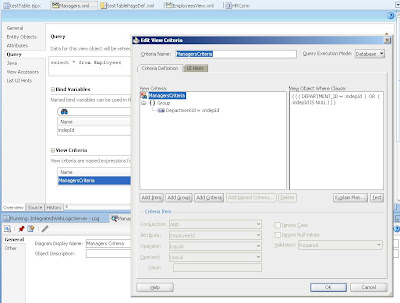
I have created an updatable table with the above fields and added auto-submit and partial trigger properties

So for example (testTable.jspx)
When Department is Administration there are 2 selectable employees (189,200) for manager Id
When Department is Marketing there are 3 different selectable employees (190,201,202) for manager Id

It works correctly as long as there is no validation error in manager id field.


To reproduce the problem, do the following:

1. Select row for employee 190 that has department Marketing and type in ManagerId field the value 200.
2. Select an other row. A validation error shows for Manager Id.
3. Select again the same row and change Department to Administration. (Validation error continue to show)
4. open ManagerId LOV. The values shown are wrong (190,201,202). The ManagerId LOV is not refreshed according to Department.
5. Select or Type a value in field (i.e. 201 that is invalid) and press commit. The invalid value cleared. The row is saved to database with null value for manager id.
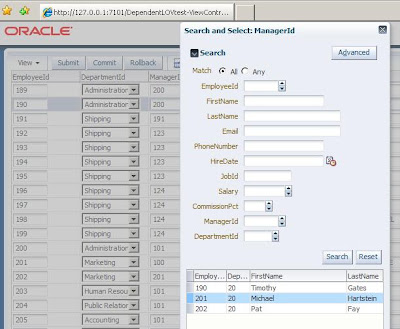

This issue does not reproduce in form layout (testForm.jspx) since Manager Lov always becomes null when department is changed.

It is quite confusing for the users.

Test Case:
http://adfbugs.googlecode.com/files/DependentLOVtest.zip

Still reproduce in jdeveloper 11.1.2
The workaround we found for this is in managed bean to resetValue of the LOV component in the value change listener of choise list

Wednesday, November 24, 2010

LOVs does not reset criteria values. (Fixed in 11.1.1.4)

In a default input list of values you can set criteria to query for specific records and select a record with no problem
The problem is that if you open LOV again, even though the criteria values are cleared the results are still the same (filtered).This happens even if you change the record.
This has other side effects like, if LOV is autosubmit and if user types a valid value that does not exist in the previous filtered LOV data the value is not accepted and LOV opens displayed the previous filtered data.
Finally if you put criteria in LOV and select a value and then navigate away from the task flow, when you come back and open LOV the criteria values are shown and Reset button of LOV is not functional.
This functionality of LOVs cause much frustration to users.
Test Case :
http://adfbugs.googlecode.com/files/TestLOVsCriteria.zip

Steps to reproduce in the test case:
1. Not accepting valid values.
1 run Main.jspx
2 go to Test task flow.
3 open managerId LOV and type criteria (i.e. ‘A’ for firstName) and press search
4. Select a row and press ok
5. In LOV field, type a valid value of an employee that first name does not start with ‘A’ and press tab
Result: LOV opens showing rows of employees starting with A. User has to press Reset and search for the value again

* in 11.1.1.4 the valid value is accepted without opening the LOV. Yet if you open LOV second time the results rows are limited but not for employees starting with A.

2. Reset button does not work:
1 run Main.jspx
2 go to Test task flow.
3 open LOV and type criteria (i.e. ‘A’ for firstName) and press search
4. Select a row and press ok
5 Press button to Main (return from task flow)
6 go to Test task flow again
7 Open managerId LOV (Criteria values and results are visible from previous search
8. Press Reset Button on LOV (Nothing happens)
Result: LOV opens showing rows of employees starting with A and criteria value for firstName. User cannot press Reset to clear values and search again.

Wednesday, July 21, 2010

Choice list and LOV in query criteria bug (Fixed in 11.1.1.4)

We have a strange bug in our application.
When ever in query criteria we have choice list as first criterion and we have also input List of values in criteria then the input List of values does not return values.
When you open LOV and select a row the LOV closes automatically and value is not returned.

I managed to reproduce it in simple test case in HR schema with 1 choice list and 1 list of values:


The workaround is either not to use choice list as first criterion or not to have Input List of values field autosubmit = true.

Strange?

Test Case:
http://adfbugs.googlecode.com/files/TestChoiseListAndLov.zip

Monday, June 14, 2010

Range Paging in LOVs bug #9467477

Using Range Paging in LOVs is fixed in new jdeveloper 11.1.1.3.
http://adfbugs.blogspot.com/2009/07/performance-tuning-lovs-and-range.html

Yet it still has bugs, when you use LOV criteria or on dependent LOV sometimes it shows error:

java.sql.SQLException: Missing IN or OUT parameter at index:: 1 at oracle.jdbc.driver.SQLStateMapping.newSQLException(SQLStateMapping.java:70)

I have posted an SR for this and bug was logged #9467477 SQLEXCEPTION: MISSING IN OR OUT PARAMETER AT INDEX, IN LOV WITH RANGE PAGING, that it is also fixed for next jdeveloper 11.1.1.4 release. Thanks Didier.

I decided to post it also here since this bug is not public visible in Support (not even for me that i posted the SR.

Steps to reproduce in test case are:
1. Open Departments LOV
2. Scroll down to LOV until fethcing data message apears
3. Type in criteria for departmentId value i.e.'1' and without pressing Search select a row in LOV.SQL
Error message apears:


Test Case:
http://adfbugs.googlecode.com/files/LovRangePagingBug.zip

Wednesday, May 26, 2010

Single Row LOV in Query Criteria Bug (Fixed in 11.1.1.4)

When List of values has only 1 row then in query criteria you cannot set input to null after the first time you set a value.

To reproduce in the test case of Employees with Departments LOV i set where clause of DepartmentsView rownum=1.

I assign DepartmentsView as LOV in Employees.DepartmentId attribute and set it to autosubmit.

I put DepartmentId in query criteria of Employees.

I create a simple query panel with results table for Employees and i run application:


Steps to reproduce:
1. open DepartmentId LOV and select value. press tab or search
2. delete value of DepartmentId and press tab or search
Result: value is not deleted from LOV field. and search still has the criterion.

Only way to make value null is to press reset button.

Is this a bug?

Test Case:
http://adfbugs.googlecode.com/files/TestSingleRowLOV.zip

Friday, April 16, 2010

Auto Submit does not set the value in bindings if you navigate with mouse (Fixed in 11.1.1.4)

Auto Submit does not set the value in bindings if you navigate with mouse.

You can test that by debuging an input field by typing a value and go to an other field using mouse, the setter of the field is not called. Yet the value change listener is invoked.


This causes problem in dependent components also since they will be recalculated with the old value.


For example in dependent LOV by navigating away from the dependant field with the mouse it does not cause the LOV to re-execute with the new value so you may have validation error even if the value of LOV field is correct, or you may have wrong filter in LOV.


Test Case:
http://adfbugs.googlecode.com/files/TestAutoSubmitMouseNav.zip

The workaround we use in such cases is since the value change listener of DepartmentId is invoked to explicity set also the binding field value there. Like:

ADFUtils.setBoundAttributeValue("DepartmentId", valueChangeEvent.getNewValue());

Wednesday, March 24, 2010

Removing a LOV return value leaves garbage in view object (Fixed in 11.1.1.4)

We had a strange bug that was really hard to find. We found some garbage in View objects that we could not find out how they were created. Yet I manage to reproduce it by removing a return value from Edit List of values wizard. In more detail :

When you have an LOV with 1 return value then the xml in the view object is like:


When you add a second return value from LOV by edit wizard:


Then the View object XML is like:


If from the same wizard I remove the second value then unfortunately the xml does not return to the initial state. It still has the DerivedAttrNames :


This causes various bugs in interface that are not easy to find, since nothing is displayed in log:


The workaround is to remove garbage by hand from xml.

Test case:

Monday, March 8, 2010

Cascading LOV in detail view dependent on master view attribute

In some cases we have LOVs in detail view objects that are dependent on an attribute on a master view object.

For example in Departments Employees Master detail, you want to have a list of values for Employees managers to be the department Manager or employees that have the department manager. The LOV query would be :
select *
from employees
where manager_id = :inManager
or employee_id = :inManager

In the view accessor for the LOV you can set the bind variable of the LOV to get value from the master view object ‘DepartmentsView.ManagerId’ or in the employees view object you can add Departments entity and add attribute ManagerId from Departments Entity.

Yet when you change Manager of the Department in both cases the LOV does not know that the bindVariable value has changed and it is still executed with the old value of Department value.

This is happening because the LOV is notified to take new bind value when the setter of the dependent attribute is invoked.

In order to do that I created an updatable transient attribute LOVManagerId that on the getter when it has no internal value it gets the value from Departments entity reference attribute.

public Number getLOVManagerId() {
if (getAttributeInternal(LOVMANAGERID)==null)
return this.getDepartmentManagerId();
return (Number) getAttributeInternal(LOVMANAGERID);
}


Now on the getter of reference entity attribute I check if entity attribute has changed in order to set also the LOVManagerId.

public Number getDepartmentManagerId() {
Number empdepManager = (Number) getAttributeInternal(DEPARTMENTMANAGERID);
if (this.getDepartments().isAttributeChanged("ManagerId"))
this.setLOVManagerId(empdepManager);
return empdepManager;
}

Partial triggers form Department.ManagerId field to Employees table will finish the job.


Test Case :
http://adfbugs.googlecode.com/files/MasterDependentLOV.zip

Thursday, February 11, 2010

New Cascading LOV with required View Criterion Not a Bug

On july 2009 in the patch of jdeveloper (11.1.1.1.0) a new feature was introduced in view criteria. When a criterion is required then an error message is shown to user. Of course not without side-effects (http://adfbugs.blogspot.com/2009/07/query-component-required-criterion-bug.html)
On the latest patch of jdeveloper (11.1.1.2.0) a new feature and bugs was introduced in view criteria (http://adfbugs.blogspot.com/2010/01/new-bind-variable-and-view-criteria-bug.html)
The above bugs also effected the functionality of LOVs especially of those that use view criteria, either for selective required (http://adfbugs.blogspot.com/2010/01/selectively-required-criteria-in-lov.html) or for cascading LOVs.

In the current test case I have Employees and I want the List of value of Managers to depend on the department of the employee. I expect when the user has not selected a department the List of values of managers to be empty


Yet when I run application, just when I set department to null I get the following error.

ADF: Adding the following JSF error message: Attribute DepartmentId is required.
oracle.jbo.AttrValException: JBO-27035: Attribute DepartmentId is required.
at oracle.jbo.rules.JboVCItemRequiredValidator.validateItem(JboVCItemRequiredValidator.java:91)
at oracle.jbo.rules.JboVCItemRequiredValidator.validate(JboVCItemRequiredValidator.java:161)
at oracle.jbo.common.ViewCriteriaImpl.validateRow(ViewCriteriaImpl.java:606)
at oracle.jbo.common.ViewCriteriaImpl.validate(ViewCriteriaImpl.java:567)
at oracle.jbo.server.ViewRowSetImpl.validateViewCriteria(ViewRowSetImpl.java:7745)
User will think that DepartmentId is required, yet only the hidden criterion of LOV is required.


But actually it is just a warning, since if I press ok and submit then the new values are submitted, even though the value of ManagerId is not valid.

If I open ManagerLOV I get again the error and the LOV opens with no data.


If I clear the value of Manager I get the error again.

This is realy confusing and makes view criteria not usable in cascading LOVs.

The workaround we do for these cases is not to use view criteria for cascading LOVs but to put conditions directly in the where clause of the query.
i.e. WHERE DEPARTMENT_ID = :inDepId

Test Case
http://adfbugs.googlecode.com/files/TestLOVwithRequiredCriterion.zip

Thanks,
Anonymous said... In this case, all you need is to set "Validation" to "Optional" and leave "Ignore Null Values" un-checked.

I tried it and works fine.

Monday, January 18, 2010

Selectively required criteria in LOV (Fixed in 11.1.1.3)

In order to improve performance in LOVs I tried to set selectively required criteria, so that the query of LOV should always run with some parameters.
So in simple department LOV in employees.departmentId attribute I put view criteria with selectively required option.


Also as in test case :
http://adfbugs.blogspot.com/2009/08/lov-execute-query-many-times.html
I override the method executeQuery for collection and print the query:

@Override
protected void executeQueryForCollection(Object object, Object[] object2, int i) {
System.out.println("EmployeesLOV executes Query :" + this.getQuery());
super.executeQueryForCollection(object, object2, i);
}

When I run application and open LOV and select a value, in log I see that 3!? Queries are executed:

Query : SELECT Departments.DEPARTMENT_ID, Departments.DEPARTMENT_NAME, Departments.MANAGER_ID, Departments.LOCATION_ID FROM DEPARTMENTS Departments WHERE ( ( (UPPER(Departments.DEPARTMENT_NAME) LIKE UPPER( :vc_temp_1 '%') ) ) )
Query : SELECT Departments.DEPARTMENT_ID, Departments.DEPARTMENT_NAME, Departments.MANAGER_ID, Departments.LOCATION_ID FROM DEPARTMENTS Departments WHERE ( ( ( (UPPER(Departments.DEPARTMENT_NAME) LIKE UPPER( :vc_temp_1 '%') ) ) ) AND ( ( (Departments.DEPARTMENT_ID LIKE :vc_temp_2 ) ) AND ( ( (UPPER(Departments.DEPARTMENT_NAME) LIKE UPPER( :vc_temp_3 '%') ) ) ) ) )
Query : SELECT Departments.DEPARTMENT_ID, Departments.DEPARTMENT_NAME, Departments.MANAGER_ID, Departments.LOCATION_ID FROM DEPARTMENTS Departments

The Last query without any criteria !?

If I just type a valid value to the field and press tab then 4!? Queries are executed:

Query : SELECT Departments.DEPARTMENT_ID, Departments.DEPARTMENT_NAME, Departments.MANAGER_ID, Departments.LOCATION_ID FROM DEPARTMENTS Departments WHERE ( ( (Departments.DEPARTMENT_ID LIKE ( :vc_temp_1 '%') ) ) )
Query : SELECT Departments.DEPARTMENT_ID, Departments.DEPARTMENT_NAME, Departments.MANAGER_ID, Departments.LOCATION_ID FROM DEPARTMENTS Departments WHERE (Departments.DEPARTMENT_ID = :fbkKy__0)
Query : SELECT Departments.DEPARTMENT_ID, Departments.DEPARTMENT_NAME, Departments.MANAGER_ID, Departments.LOCATION_ID FROM DEPARTMENTS Departments WHERE ( ( (Departments.DEPARTMENT_ID LIKE :vc_temp_1 ) ) AND ( ( (UPPER(Departments.DEPARTMENT_NAME) LIKE UPPER( :vc_temp_2 '%') ) ) ) )
Query : SELECT Departments.DEPARTMENT_ID, Departments.DEPARTMENT_NAME, Departments.MANAGER_ID, Departments.LOCATION_ID FROM DEPARTMENTS Departments

The Last query again without any criteria !?

So you don’t gain much in performance of LOV since the query is executed many times again and without any criteria
.

Also sometimes when you just type a value, you get the PPR exception, or an invalid value exception even if the value is valid.

Steps to reproduce:
1. Run TestLOV page
2. open department LOV, type A in DepartmentName criterion and press search
3. Without selecting a row press OK or cancel.
4. Type a valid value to LOV (i.e. 50) invalid value message appear.


5. Open LOV again, press OK or cancel then press submit button


oracle.jbo.AttrValException: JBO-27036: At least one of the following attributes DepartmentName, ManagerId is required. at oracle.jbo.rules.JboVCItemRequiredValidator.validate(JboVCItemRequiredValidator.java:172) at oracle.jbo.common.ViewCriteriaImpl.validateRow(ViewCriteriaImpl.java:606)

It seems that Selectively required criteria in LOV has some issues.

Test Case :
http://adfbugs.googlecode.com/files/TestLovSelectivelyRequired.zip

Friday, November 6, 2009

Attribute Validation on Input List of Values attribute

If you have an attribute validation in an Entity Attribute that is used in a view object as Input List of values then validation does not work correctly.

For testing i added a simple validation in departmentId of Employees Entity that it should be less than 100:


I set departmentId as Input List of values and autosubmit.
When I run the page and i select an invalid department then the value is not set to the field and i have no validation Error


So in the page it looks that nothing have changed. But if i submit the page, the invalid value appears in department and the error message also.


So is this a bug?

The workaround we are using is to filter LOV to show only valid values to select, or to override the setter of the entity, which i do not consider as a good practice.

test case:
http://adfbugs.googlecode.com/files/TestLOVValidation.zip

Tuesday, November 3, 2009

Returning Multiple values from LOV in af:query with bind variables bug

We get nullPointerException when returning multiple values from LOV in view criteria with bind variables.

To reproduce it in EmployeesView for departmentId I added LOV that also return ManagerId.


It work fine for Forms (TestForm) and for tables(TestTable), but not for af:query with bind variables:

I created 2 view criteria with departmentId and ManagerId, 1 with bind variables and 1 with no bind variables. And 2 pages 1 for each
TestQuery1 with af:query with bind variables
TestQuery with af:query with no bind variables

When trying to select department in TestQuery1 we get:


Caused by: java.lang.NullPointerException
at oracle.adfinternal.view.faces.model.binding.FacesCtrlSearchBinding$AdfCriterionValues.(FacesCtrlSearchBinding.java:2834)
at oracle.adfinternal.view.faces.model.binding.FacesCtrlSearchBinding$AdfAttributeCriterion.(FacesCtrlSearchBinding.java:1732)
at oracle.adfinternal.view.faces.model.binding.FacesCtrlSearchBinding$AdfConjunctionCriterion._loadCriterionList(FacesCtrlSearchBinding.java:2775)
at oracle.adfinternal.view.faces.model.binding.FacesCtrlSearchBinding$AdfConjunctionCriterion._loadCriterionList(FacesCtrlSearchBinding.java:2725)
at oracle.adfinternal.view.faces.model.binding.FacesCtrlSearchBinding$AdfConjunctionCriterion.getCriterionList(FacesCtrlSearchBinding.java:2633)
at sun.reflect.GeneratedMethodAccessor840.invoke(Unknown Source)
at sun.reflect.DelegatingMethodAccessorImpl.invoke(DelegatingMethodAccessorImpl.java:25)
at java.lang.reflect.Method.invoke(Method.java:597)


Yet TestQuery return correctly departmentId and ManagerId.

So I guess the workaround is not to use bind variables in view criteria.

Test Case
http://adfbugs.googlecode.com/files/LOVReturn.zip

Sunday, August 30, 2009

LOV execute query many times (Fixed in 11.1.1.3)

Input list of values component has big performance issues, and it seems not suitable for view objects with a lot of data.
Not only you cant use performance tuning since there are bugs if you use range paging:
http://adfbugs.blogspot.com/2009/07/performance-tuning-lovs-and-range.html
and Up to row number:
http://adfbugs.blogspot.com/2009/08/lov-view-object-tuning-only-up-to-row.html

but also because every time you open LOV and select a value it execute query many times.

To test that, i override the method executeQuery for collection and print the query:

@Override
protected void executeQueryForCollection(Object object, Object[] object2, int i) {
System.out.println("EmployeesLOV executes Query :" + this.getQuery());
super.executeQueryForCollection(object, object2, i);
}

when i open the lov and select a value i get the following log:

EmployeesLOV executes Query :Select * from Employees
30-Aug-2009 17:25:04 oracle.adfinternal.view.faces.renderkit.rich.RichRenderKit isNavigating
SEVERE: The original view root was not set.
EmployeesLOV executes Query :SELECT * FROM (Select * from Employees) QRSLT WHERE ( ( ( (EMPLOYEE_ID = :vc_temp_2 ) ) ) )
EmployeesLOV executes Query :Select * from Employees


so the LOV query is executed 3 times !?

If i type a value to fields that many LOV values start with this value then it is executed many times !!!.

EmployeesLOV executes Query :SELECT * FROM (Select * from Employees) QRSLT WHERE ( ( (EMPLOYEE_ID LIKE :vc_temp_2 ) ) )
30-Aug-2009 17:31:34 oracle.adfinternal.view.faces.renderkit.rich.RichRenderKit isNavigating
SEVERE: The original view root was not set.
EmployeesLOV executes Query :SELECT * FROM (Select * from Employees) QRSLT WHERE ( ( (EMPLOYEE_ID LIKE :vc_temp_2 ) ) )
EmployeesLOV executes Query :SELECT * FROM (Select * from Employees) QRSLT WHERE ( ( (EMPLOYEE_ID = :vc_temp_2 ) ) )
EmployeesLOV executes Query :Select * from Employees


Also while you scroll up and down in LOV the query is also executed many times.

Finaly if you type a value that many LOV values start with this value and scroll down then other values that dont start with this value are visible:


And if you select the value then you get a strange error:


Is this a bug?

Is there a way to use LOVs with a lot of data?

Test case:
http://adfbugs.googlecode.com/files/TestPerformance.zip

For the test case i put in Employees table about 100000 rows with the following procedure:

create or replace
PROCEDURE CREATE_EMPLOYEES AS
BEGIN
FOR i IN 1..100000 LOOP
Insert into employees (employee_id,
last_name,
email,
hire_date,
job_id)
select employees_seq.nextval as employee_id,
'auto' i as last_name,
'aut' i '@gmail.com' as email,
sysdate as hire_date,
'IT_PROG' as job_id
from dual;
END LOOP;
COMMIT;
END CREATE_EMPLOYEES;

Wednesday, August 5, 2009

LOV criteria bug.

Some times after using search criteria inside an LOV we get a strange exception:

java.sql.SQLException: Attempt to set a parameter name that does not occur in the SQL: vc_temp_2
at oracle.jdbc.driver.SQLStateMapping.newSQLException(SQLStateMapping.java:70)
at oracle.jdbc.driver.DatabaseError.newSQLException(DatabaseError.java:133)
at oracle.jdbc.driver.DatabaseError.throwSqlException(DatabaseError.java:199)
at oracle.jdbc.driver.DatabaseError.throwSqlException(DatabaseError.java:263)
at oracle.jdbc.driver.DatabaseError.throwSqlException(DatabaseError.java:271)
at oracle.jdbc.driver.OraclePreparedStatement.setObjectAtName(OraclePreparedStatement.java:11158)
at oracle.jdbc.driver.OraclePreparedStatementWrapper.setObjectAtName(OraclePreparedStatementWrapper.java:815)
at oracle.jbo.server.OracleSQLBuilderImpl.bindParamValue(OracleSQLBuilderImpl.java:4617)
at oracle.jbo.server.BaseSQLBuilderImpl.bindParametersForStmt(BaseSQLBuilderImpl.java:3807)
at oracle.jbo.server.ViewObjectImpl.bindParametersForCollection(ViewObjectImpl.java:18278)
at oracle.jbo.server.QueryCollection.buildResultSet(QueryCollection.java:1035)
at oracle.jbo.server.QueryCollection.executeQuery(QueryCollection.java:815)
at oracle.jbo.server.ViewObjectImpl.executeQueryForCollection(ViewObjectImpl.java:5892)
at oracle.jbo.server.ViewRowSetImpl.execute(ViewRowSetImpl.java:1021)
at oracle.jbo.server.ViewRowSetImpl.execute(ViewRowSetImpl.java:889)
…


It is not easy to reproduce but when it happens you cannot open the LOV again and you cannot set a value to the LOV field, even from diferent row or from diferent session.

I managed to reproduce it in a simple test case of Employees form with simple Department LOV.
The steps to reproduce are:


1.Select an existing department

2.open department LOV add a criterion and press search.


3.Close LOV without selecting row and type a non existing value and press Tab. LOV automatically opens and even though it doesnt have values in criteria only the previus results are visible.


4.Press cancel again and type an existing value and press Tab. Then the error apears

It seems that LOVs Love bugs.

Tuesday, August 4, 2009

LOV view object Tuning: 'Only up to row number' bug (Fixed in 11.1.1.3)

Since we can not use Range paging on LOVs for performance Tuning due to bug 8722958 :
http://adfbugs.blogspot.com/2009/07/performance-tuning-lovs-and-range.html

I try the 'Only up to row Number' option in a simple employees form with Input List of values for DepartmentId.

so when i open the LOV only 10 rows apear:


Bug1: if i try to type number 110 that is a valid value but does not exist in the range, the value just disapear without even opening the LOV.


Bug2: If i type the number 20 then since both 20 and 200 exist it opens the LOV to select 1. but if i select cancel and after that i type the number 200 the value is set back to 20 and i get a stange error:


Is this a bug?
Or we should not use Tuning: 'Only up to row number' for LOV view objects?

Test case:
http://adfbugs.googlecode.com/files/TestLimitedLov.zip

Tuesday, July 21, 2009

Performance Tuning, LOVs and Range Paging bug (Fixed in 11.1.1.3)

I try to Implement performance tuning on view objects

So in the same application bellow I set for ManagersLov view object Access Mode = Range Paging and Range Size = 26


But when I run the application and try to open Managers LOV I get the following exception:
java.sql.SQLException: Attempt to set a parameter name that does not occur in the SQL: Bind_RangePage_High at oracle.jdbc.driver.SQLStateMapping.newSQLException(SQLStateMapping.java:70) at oracle.jdbc.driver.DatabaseError.newSQLException(DatabaseError.java:133) at oracle.jdbc.driver.DatabaseError.throwSqlException(DatabaseError.java:199) at oracle.jdbc.driver.DatabaseError.throwSqlException(DatabaseError.java:263) at oracle.jdbc.driver.DatabaseError.throwSqlException(DatabaseError.java:271) at oracle.jdbc.driver.OraclePreparedStatement.setIntAtName(OraclePreparedStatement.java:11026) at oracle.jdbc.driver.OraclePreparedStatementWrapper.setIntAtName(OraclePreparedStatementWrapper.java:783) at oracle.jbo.server.OracleSQLBuilderImpl.bindRangePagingParams(OracleSQLBuilderImpl.java:1655) at oracle.jbo.server.ViewObjectImpl.bindRangePagingParams(ViewObjectImpl.java:3845) at oracle.jbo.server.ViewObjectImpl.bindParametersForCollection(ViewObjectImpl.java:18320) at oracle.jbo.server.QueryCollection.buildResultSet(QueryCollection.java:1035) at oracle.jbo.server.QueryCollection.executeQuery(QueryCollection.java:815) at oracle.jbo.server.ViewObjectImpl.executeQueryForCollection(ViewObjectImpl.java:5892) at oracle.jbo.server.ViewRowSetImpl.execute(ViewRowSetImpl.java:1021) at oracle.jbo.server.ViewRowSetImpl.execute(ViewRowSetImpl.java:889) at oracle.jbo.server.ViewRowSetIteratorImpl.ensureRefreshed(ViewRowSetIteratorImpl.java:2734) at oracle.jbo.server.ViewRowSetIteratorImpl.ensureRefreshed(ViewRowSetIteratorImpl.java:2711) at oracle.jbo.server.ViewRowSetIteratorImpl.first(ViewRowSetIteratorImpl.java:1540) at oracle.jbo.server.ViewRowSetImpl.first(ViewRowSetImpl.java:3231) at oracle.adf.model.binding.DCIteratorBinding.setupRSIstate(DCIteratorBinding.java:757) at oracle.adf.model.binding.DCIteratorBinding.refreshControl(DCIteratorBinding.java:657) at oracle.jbo.uicli.binding.JUIteratorBinding.refreshControl(JUIteratorBinding.java:473) at oracle.adf.model.binding.DCIteratorBinding.rangeRefreshed(DCIteratorBinding.java:863) at oracle.adf.model.binding.DCIteratorBinding.bindRowSetIterator(DCIteratorBinding.java:499) at oracle.jbo.uicli.jui.JULovButtonBinding.bindRowSetIterator(JULovButtonBinding.java:1289) at oracle.jbo.uicli.binding.JUCtrlListBinding.createListIterBinding(JUCtrlListBinding.java:903) at oracle.jbo.uicli.binding.JUCtrlListBinding.initFromServerBinding(JUCtrlListBinding.java:593) at oracle.jbo.uicli.binding.JUCtrlListBinding.setupListItems(JUCtrlListBinding.java:663) at oracle.jbo.uicli.jui.JULovButtonBinding.actionPerformed(JULovButtonBinding.java:803) at javax.swing.AbstractButton.fireActionPerformed(AbstractButton.java:1995) at javax.swing.AbstractButton$Handler.actionPerformed(AbstractButton.java:2318) at javax.swing.DefaultButtonModel.fireActionPerformed(DefaultButtonModel.java:387) at javax.swing.DefaultButtonModel.setPressed(DefaultButtonModel.java:242) at javax.swing.plaf.basic.BasicButtonListener.mouseReleased(BasicButtonListener.java:236) at java.awt.Component.processMouseEvent(Component.java:6134) at javax.swing.JComponent.processMouseEvent(JComponent.java:3265) at java.awt.Component.processEvent(Component.java:5899) at java.awt.Container.processEvent(Container.java:2023) at java.awt.Component.dispatchEventImpl(Component.java:4501) at java.awt.Container.dispatchEventImpl(Container.java:2081) at java.awt.Component.dispatchEvent(Component.java:4331) at java.awt.LightweightDispatcher.retargetMouseEvent(Container.java:4301) at java.awt.LightweightDispatcher.processMouseEvent(Container.java:3965) at java.awt.LightweightDispatcher.dispatchEvent(Container.java:3895) at java.awt.Container.dispatchEventImpl(Container.java:2067) at java.awt.Window.dispatchEventImpl(Window.java:2458) at java.awt.Component.dispatchEvent(Component.java:4331) at java.awt.EventQueue.dispatchEvent(EventQueue.java:599) at java.awt.EventDispatchThread.pumpOneEventForFilters(EventDispatchThread.java:269) at java.awt.EventDispatchThread.pumpEventsForFilter(EventDispatchThread.java:184) at java.awt.EventDispatchThread.pumpEventsForHierarchy(EventDispatchThread.java:174) at java.awt.EventDispatchThread.pumpEvents(EventDispatchThread.java:169) at java.awt.EventDispatchThread.pumpEvents(EventDispatchThread.java:161) at java.awt.EventDispatchThread.run(EventDispatchThread.java:122)

So is this a bug?
Can we use Access Type and Range paging in view objects that are used as LOVs?